Configure AI
Where is my API key stored?
API keys are stored in the system Keychain and are not shown in plain text on the settings page.
Can I configure multiple providers?
Yes. Each provider can have multiple keys, and you can choose the active key and model.
Can I edit prompts?
Free manual AI uses default prompts and the provider’s default Base URL. Custom prompts and Base URLs require Pro. Online AI uses your own API key; provider charges are separate, and Pro includes no AI credits.
Experimental models
Pro users can download experimental models on compatible devices. They are still under evaluation and may be unstable. Check important results. Free models include Whisper Tiny/Base/Small, Qwen3 0.6B MLX and Qwen2.5 1.5B. Model files do not sync through iCloud.
Memory and reference notes
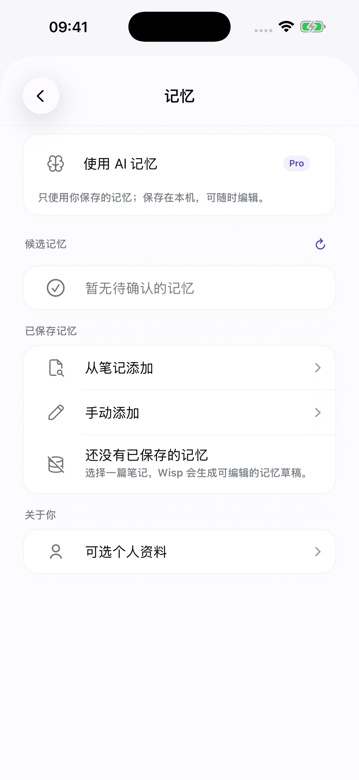
Open Related beside Original at the bottom of a note. Wisp checks note text and tags on your device to find up to four related notes using keywords and tags. It may also suggest one original sentence from the current note expressing a preference, constraint, or decision. Suggestions are not saved as lasting memories automatically; tap Save as memory to keep one. Memory settings contain an overall memory switch and a separate switch for using your personal profile; you no longer choose each memory or profile for every request. Connect ideas and Compare changes use the current note and related notes, up to five in total; Recent review uses the five most recent notes from the last seven days. Each note contributes up to 3,000 characters. Opening Related does not connect to an AI provider. Tapping an action runs the configured summary model; an online provider receives the excerpts in that action’s scope and any enabled memory/profile context. Local models process this on device. Memories guide preferences, not new facts. Results list their source notes for checking and can be saved as new notes without changing the originals. A saved memory can return to its source while that note remains available.
Memory has three cards: AI memory for saved memories, Personal for your profile, and Review for weekly reminders, review history and long-term themes. The reminder weekday and time remain visible even when reminders are off. Optional association models are managed in Settings > Local models; Gemma notices remain in About > Acknowledgements, with consent before the first download.
Wisp can compare sentence meanings using an available Apple on-device language model, with keywords and tags as a fallback. You may also download and select one of two optional offline association models: EmbeddingGemma 300M (about 334 MB) or multilingual MiniLM INT8 (about 128 MB), including tokenizer files. After download and selection, these models compare notes only on this device; note text is not sent to the model host or an AI provider for association. Downloading model files requires a network connection. Model files stay local and are excluded from iCloud sync and backup.
Processing and weekly reviews
After starting an AI action, you can leave its page and find the result later in Memory. Processing may continue briefly when Wisp goes into the background, but iOS can interrupt it. Failed or interrupted requests are not automatically retried. If notifications are already allowed, Wisp may send a completion notice without note text.
Weekly reminders are off by default and require Pro. You can enable a local notification for Sunday at 20:00, or choose another weekday and time. With notification permission, iOS can remind you even when Wisp is closed; Focus and system notification settings may delay or silence it. A weekly reminder does not start AI processing; weekly reviews still require a tap. In review history, tap Start review to use the configured summary model on all available, nondeleted notes with text created or last edited during the preceding seven local calendar days. The range ends at your tap and uses the currently saved text, not historical versions. Full text is split into batches and combined, without a five-note or 3,000-character-per-note limit. An online model receives those batches, necessary intermediate summaries and enabled memory/profile context; multiple requests may incur usage charges. Local models process the content on device. Memory and profile switches still apply. Failed or interrupted requests are not retried automatically. Turning the reminder off removes future reminders and does not automatically cancel a review you explicitly started.
Long-term themes can be started manually. Automatic updates are off by default and require your explicit consent. Once enabled, Wisp incrementally updates themes from changed notes after edits settle, only while the app is in the foreground. There is no fixed schedule or guaranteed background run. The same failed input is not automatically retried; changing the provider or processing route requires consent again. They use the currently available text across your note library, rather than only the past week. Wisp caches summaries of individual notes locally to reuse unchanged material; editing or deleting a source invalidates its cached summary. An online summary model receives the required source text and intermediate summaries, without saved memories or profile context; a local model processes them on device. Large libraries can require multiple requests and incur provider charges. Results and cached summaries remain on this device and do not automatically change source notes, lasting memories or personal profile fields. Check the sources before saving a result.
Memory keeps up to 52 review records and 12 manually started result records on this device, including failed attempts. This history is excluded from backups and iCloud sync. Results may contain personal information; you can delete them or explicitly save a successful result as a new note. Saving creates an ordinary note with the usual note sync and backup behavior. It does not change the original notes or automatically add lasting memories.